 effectuate
Where BW keeps your query logic: a technical guide to find duplicate key figures and assess migration scope
Which RSZ tables hold your query logic, how to find key figures that are copies of the same logic, and how to estimate what must move to SAP Business Data Cloud.
 By Sonni Jacobsen12 min read
This is a technical guide for BW developers to help answer four questions before migrating to a modern data platform:
- Which queries do people use?
- Which key figures are copies of the same logic?
- Which key figure names hide different logic?
- What must move to SAP Business Data Cloud?
How BW stores a query
This guide uses ten RSZ tables for the query definition, plus RSDKYF for the key figure InfoObjects and RSDDSTAT_OLAP for the usage. Cell definitions are not covered.
BW does not keep a query as one definition that you can read. It keeps the query as a set of elements: the query, its query sheet, its filter, its structures, each key figure, each formula and each variable. The query sheet is the element that connects the query to its rows and columns. Each element has a unique ID (UID).
The tables are in four groups. Figure 1 shows the join conditions, and the cardinality where we checked it: how many rows on one side belong to one row on the other side.
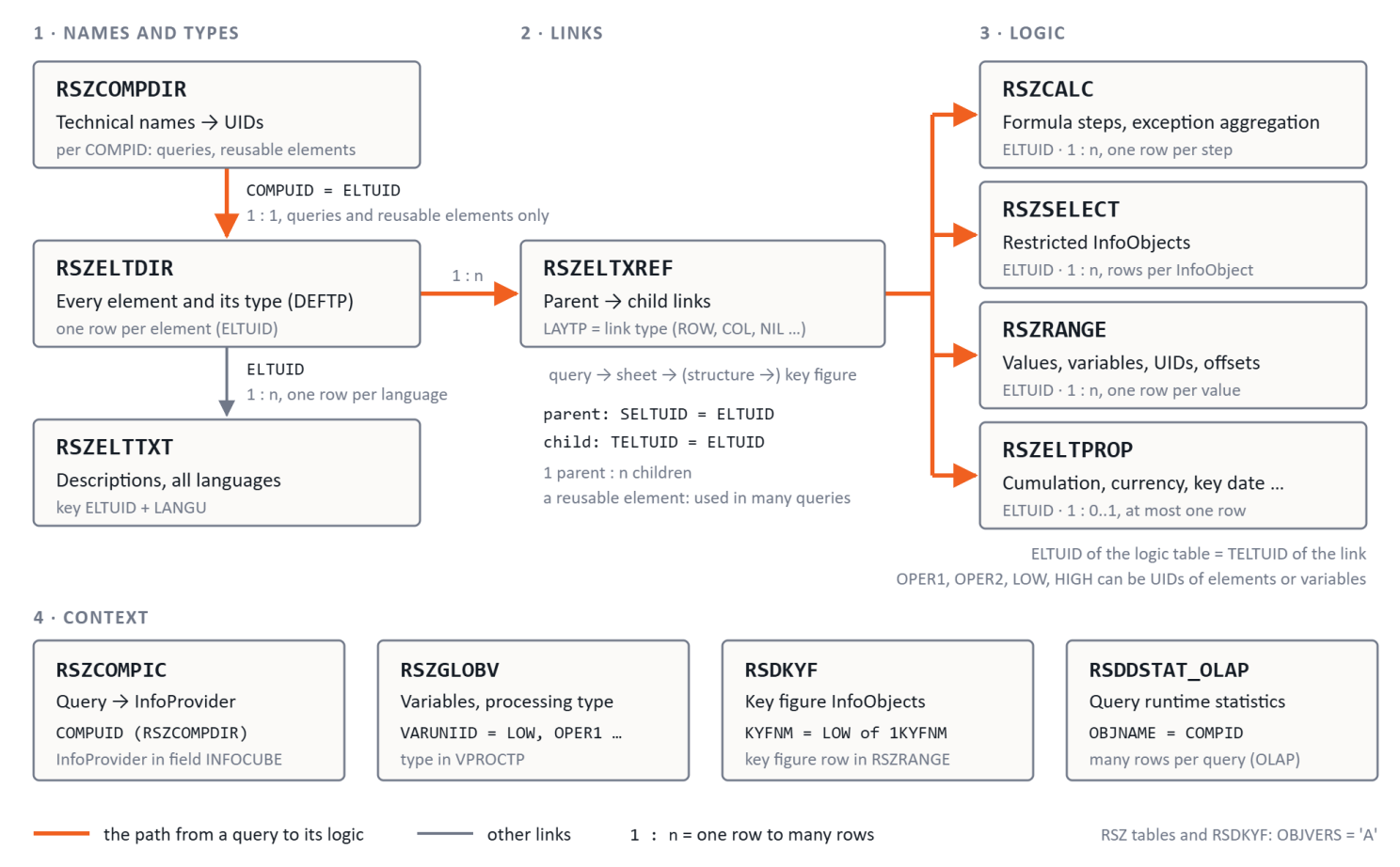
Names and types. Three tables give the names and types.
- RSZCOMPDIR: the UID (COMPUID) for each technical name (COMPID). It contains only queries and reusable elements. A few technical names can have more than one active UID. So when you look up a name, also filter on the type in RSZELTDIR, for example DEFTP = 'REP' for queries.
- RSZELTDIR: each element with its type in the field DEFTP: REP (query), SHT (query sheet), SOB (filter), STR (structure), SEL (restricted key figure or selection), CKF (calculated key figure), FML (formula) and VAR (variable).
- RSZELTTXT: the descriptions that your users see, in all languages.
A reusable element is saved on its own and can be used in many queries. A local element exists in one query only and has no row in RSZCOMPDIR.
Links. RSZELTXREF connects the elements: parent (SELTUID) to child (TELTUID). The field LAYTP gives the type of link.
Two terms help here. A key figure element is a key figure in a query structure, with its own UID. A key figure InfoObject, such as 0NETVAL, is the basic key figure in RSDKYF. To get from a query to the logic of its key figure elements, follow three steps:
- Query to query sheet. The query always links to its query sheet (an element of type SHT) and to its filter (type SOB). Some queries also link to their variables (type VAR), but not all.
- Query sheet to key figure. The query sheet links to the structures in the rows (LAYTP ROW) and the columns (LAYTP COL). It also links directly to most key figure elements. So a key figure element is two or three links below the query: directly below the query sheet, or below a structure (query → sheet → structure → key figure). Not every key figure in a structure also has the direct link, so follow both paths.
- Key figure to logic. The UID of the key figure (TELTUID) is the ELTUID in the logic tables.
Keep the query UID on each row when you follow the links down. Then count each key figure element only once: per query with DISTINCT on the query UID and TELTUID, or for the whole system with DISTINCT on TELTUID.
A structure can also contain characteristic selections. They are also of type SEL. In the SQL that we wrote for this guide, a key figure element is one of these: SEL elements with a key figure restriction (a row with IOBJNM = '1KYFNM' in RSZRANGE), and all CKF and FML elements.
On BW/4HANA, NIL is the normal link from a structure to its key figures. Do not filter it out. On an older release, check the LAYTP values on one query that you know before you filter on them.
Logic. Four tables contain the logic of each element. Each table joins to the element on ELTUID (the TELTUID of the link). Do not join the logic tables to each other on ELTUID alone, because that multiplies the rows.
- RSZCALC: one row for each formula step (STEPNR), with the operator (OPERA), up to two operands (OPER1, OPER2) and the exception aggregation, if there is one.
- RSZSELECT: one or more rows for each restricted InfoObject.
- RSZRANGE: one row for each value or range. LOW and HIGH can be values, variables or the UIDs of other elements. SHIFTLOW and SHIFTHIGH contain offsets, for example "previous year".
- RSZELTPROP: at most one row for each element, with properties such as cumulation, local calculation, constant selection, currency and unit translation, key date and hidden. Users often do not see these properties, but many of them change the numbers.
Context. Four more tables give the context of a query.
- RSZCOMPIC: the InfoProvider of each query (field INFOCUBE).
- RSZGLOBV: the variables and their processing type (VPROCTP), for example 1 replacement path, 3 customer exit or 5 user entry. Not all queries link to their variables. To find the variables in restrictions and formulas, join on VARUNIID = LOW or HIGH in RSZRANGE, and on VARUNIID = OPER1 or OPER2 in RSZCALC. Then add the VAR links of the query.
- RSDKYF: the key figure InfoObjects.
- RSDDSTAT_OLAP: the query runtime statistics. The query name is in OBJNAME, on the rows with HANDLETP = 'OLAP'. The BW statistics must be active.
Three rules prevent many errors:
- In the RSZ tables and in RSDKYF, always filter on OBJVERS = 'A' to get the active version.
- Read the texts in one language. Use a second language for elements that have no text in the first. Many key figure elements have no text at all, for example a basic key figure in a structure. The query shows the text of the key figure InfoObject (RSDIOBJT), so use that text for these elements.
- Know the default values in RSZELTPROP on BW/4HANA. The default value is different for each field: '#' (for example hidden and cumulation), '00' (local calculation), blank (constant selection) or '0' (the currency translation and key date flags). Treat all these values as "no setting".
The Query Designer, table by table
Each area of the Query Designer (the BW Modeling Tools on BW/4HANA, BEx on older releases) has its place in the tables. Figure 2 shows each area and its table. Our example is the fictional query ZSD_SALES_YOY. It shows three key figures: the revenue for the current year, the revenue for the previous year and the growth in %.
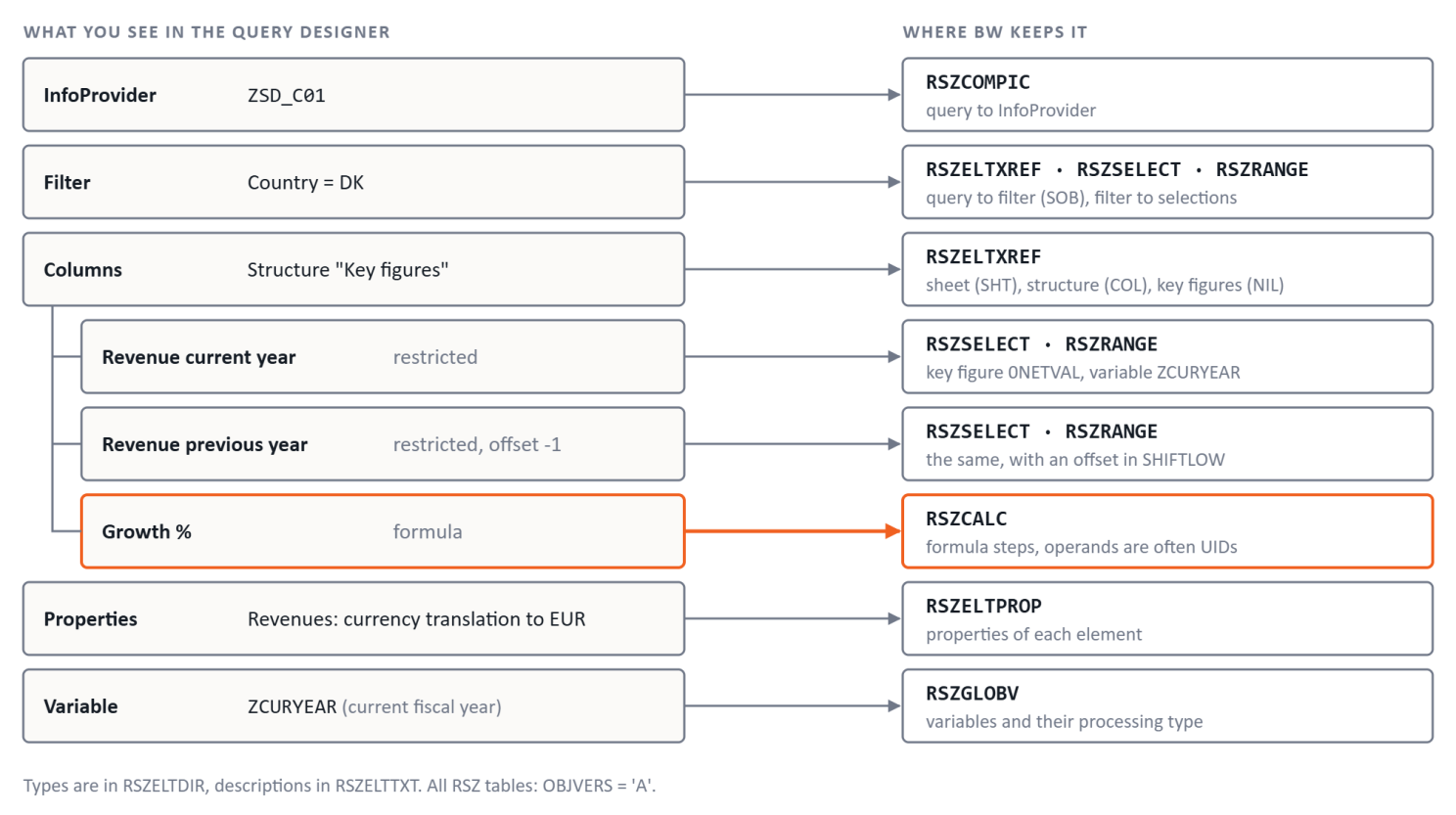
If you know the Query Designer, you already know the data model. The tables keep most of the same information, but in more rows.
How to find copies of the same key figure
The operands in RSZCALC are often UIDs, not names. Figure 3 shows how "Growth %" becomes logic that you can read and compare.
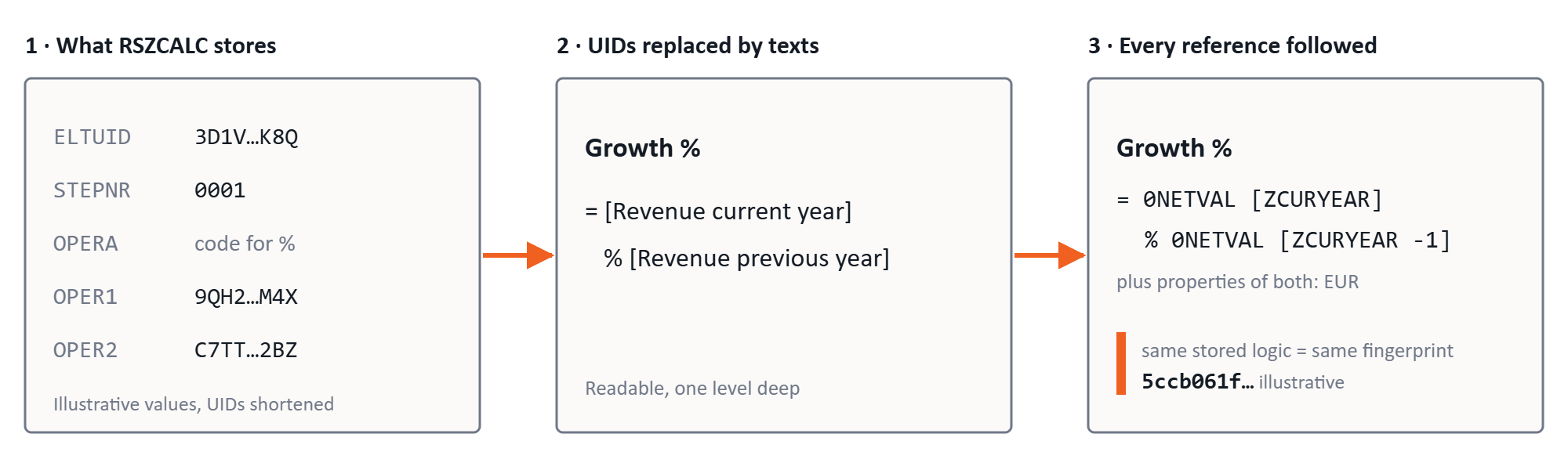
To read a formula, replace each UID with the description of the element (Figure 3, step 2). To compare formulas, do one more step. Follow each reference until you get to the key figure InfoObjects, the restriction values and the offsets (step 3). Then two elements with the same stored logic look the same.
A definition is one distinct logic. A reusable key figure element counts once, also when many queries use it.
If you run the SQL statements that we can provide, we change each definition into a fingerprint (a hash of all logic columns). When an element refers to another element, the hash uses the fingerprint of that element. The same stored logic gives the same fingerprint. The fingerprint does not always find logic that only gives the same result. For example, A + B and B + A can get different fingerprints, and so can a fixed value and a variable with the same value. It does not include display settings such as scaling, decimals, sign change and hidden. We also provide a mapping application where you can review and combine multiple fingerprints into one.
The fingerprint includes the restrictions and their offsets, the formula steps, the exception aggregation and the properties that change the number, for example cumulation, local calculation, constant selection, currency and unit translation and the key date. So "current year" and "previous year" get different fingerprints. Two elements with the same key figure InfoObject but a different cumulation also get different fingerprints.
One case needs care. A local element that only points to another key figure element is a reference, not a copy. You find it in RSZRANGE: on the row with IOBJNM = '1KYFNM', LOW contains the UID of an element, not the name of a key figure InfoObject. A reference has the same logic as its target. It does not add a new definition. It counts under the definition of its target.
The four questions in SQL
Which queries do people use? Start from all queries, so that queries with no use also show.
- Start set: the elements in RSZELTDIR with DEFTP = 'REP', with their technical names from RSZCOMPDIR.
- Join: add RSDDSTAT_OLAP with a left outer join on OBJNAME = COMPID and HANDLETP = 'OLAP'. Put both conditions in the join, not in the WHERE clause.
- Measures: for each query, count the different SESSIONUID values (sessions) and UNAME values (users), and take the last STARTTIME (last use). Show sessions and users together. A scheduled refresh can give a query thousands of sessions with few users.
Question 1 as SQL (read-only; add your BW schema to the table names):
SELECT c.COMPID                     AS QUERY_NAME,
       COUNT(DISTINCT s.SESSIONUID) AS SESSIONS,
       COUNT(DISTINCT s.UNAME)      AS USERS,
       MAX(s.STARTTIME)             AS LAST_USE
  FROM RSZCOMPDIR c
  JOIN RSZELTDIR d
    ON d.ELTUID = c.COMPUID AND d.OBJVERS = 'A' AND d.DEFTP = 'REP'
  LEFT OUTER JOIN RSDDSTAT_OLAP s
    ON s.OBJNAME = c.COMPID AND s.HANDLETP = 'OLAP'
 WHERE c.OBJVERS = 'A'
 GROUP BY c.COMPID;
The counts cover the whole period that BW keeps statistics. Queries with no use show 0 sessions and no last use. For the last 90 days only, add a condition on STARTTIME to the join.
Which key figures have the same logic? Group the key figure elements by fingerprint. Copies of the same logic are candidates for one reusable element, or for one measure in SAP Business Data Cloud. The fingerprint does not include the query filter or the InfoProvider, so check both before you merge copies. Elements that differ only in a display setting such as hidden get the same fingerprint, so they count as copies. References are not copies. Count them with their target.
Which names hide different logic? Group the key figure elements by description in one language, and count the different fingerprints. If "Gross margin" has three different fingerprints, first check what is different. Some differences do not change the numbers, for example A + B and B + A. Then the business must decide which logic is correct.
What is in the migration scope? Use usage and logic together.
- Scope: the queries that people used in the last 90 days, and the key figure definitions in these queries.
- Flags: mark the definitions with exception aggregation, currency translation, constant selection or exit variables (VPROCTP 2 BRFplus exit, 3 customer exit, 4 SAP exit, 7 SAP HANA exit). Check the query filter for exit variables too. In our experience, these items need the most design work in SAP Business Data Cloud.
- Group: sort the scope by InfoProvider (RSZCOMPIC), because you often plan the move one InfoProvider at a time.
- Result: a list of definitions and a first estimate of the work.
Limits you must know
- Local elements are not in RSZCOMPDIR. Local formulas exist in one query only, and they can hold important logic. To find all key figure elements, start from RSZELTDIR and RSZELTXREF. RSZCOMPDIR is good only for the list of queries and reusable elements.
- The same text does not mean the same logic. And the same logic does not mean the same text. Compare the logic, not the descriptions.
- Query usage is only part of the statistics. Not every statistics session runs a query. Examples are value help, master data reads and BICS calls with no query step. (BICS is the interface that Analysis for Office and other front ends use.) Some sessions read an InfoProvider directly (OBJNAME '$' + name).
- Check that your front ends write statistics. Check on your system that each front end that you use, for example SAP Analytics Cloud or Analysis for Office, creates OLAP rows with the query name. SAP Analytics Cloud works through InA, and its rows have the handle types INA, CLNT and URL.
- The statistics have a time limit. They cover only the period that BW keeps them, and only queries with active statistics. "No use since May" does not mean "never used".
- Read access needs approval. You read the BW database schema directly. Get approval before you read the tables. Questions 2 and 3 work on any system that has your queries. Questions 1 and 4 need the statistics from your production system, so ask for read access there.
- Field lists can be different between releases. We checked the tables and fields in this guide on BW/4HANA. On an older BW release, check each field in SE11 first.
- Make sure that you know the operator codes. Do not guess the meaning of an operator code in RSZCALC. Compare it with a formula that you know in the Query Designer.
Get the SQL
At Effectuate, we are a Danish data house specialising in SAP and we share what we built. Want the SQL and LLM instructions? Send a message to Sonni Jacobsen on LinkedIn, or write to contacts@effectuate.dk. You get the read-only SQL for the four questions, the check scripts and a README.
First published on LinkedIn · 12 November 2026